
Navigate to any D2L content module where you would like the link to your Simple Syllabus to be placed.
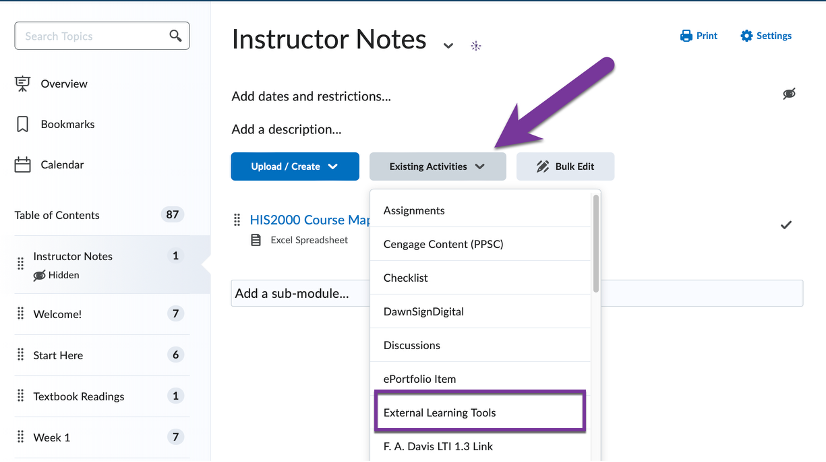
Click the gray Existing Activities button near the top center of the page. Note: If you don’t see an Existing Activities button, you may need to Add a Module first.
In the list that shows, select External Learning tools.
In the new pop-up window that displays, scroll until you find “Simple Syllabus”.

Click on Simple Syllabus to create a link to their platform. The link will show up below any existing content items already in the module but can be moved as you wish.
You will be able to work on your Simple Syllabus from this D2L Content Link. Alternatively, you can log into Simple Syllabus directly with your SSO credentials (S#) if you would like a larger window to work in. Students will also be able to access your Simple Syllabus through this D2L content link once you have published your Simple Syllabus.


You must be logged in to post a comment.