
Overview
YuJa Panorama is an integrated tool we use to measure how accessible our courses and content are. Starting today, we have changed how YuJa Panorama will assess and grade your course content. While these changes will negatively impact your accessibility scores, getting them back up will guarantee your course content is accessible. This helps us not only stay compliant with state law but create an inclusive environment where students, faculty and staff feel welcome and encouraged to succeed.
New Strict Detraction Model
Assigns a Document a Base Score of 100 – Subtracting Points Based on the Weight of Each Issue.
The new Strict Detraction model assigns each type of issue a number of points like the Weighted model, but it instead subtracts the total number of points from a base score of 100. Think of the Strict Detraction model as if it is grading your course content like an essay, working down from a perfect score.
This model does not take proportion of errors into account and is stricter but more honest than the Weighted Model. A high accessibility score under the new Strict Detraction model guarantees an accessible result.
- Minor: 1 point.
- Major: 3 points.
- Severe: 10 points (equivalent to a letter grade).
Current Scoring Thresholds
- Blue octagon: Perfect accessibility score of 100 percent.
- Green hexagon: High accessibility score between 90 and 99 percent (or an A).
- Yellow triangle: Mediocre accessibility score between 60 and 89 percent (or a B to D).
- Red hexagon: Low accessibility score between 1 and 59 percent (or an F).
- Dark red squiggly octagon: Accessibility score of 0 percent, commonly seen with auto-failing errors such as scanned PDFs.
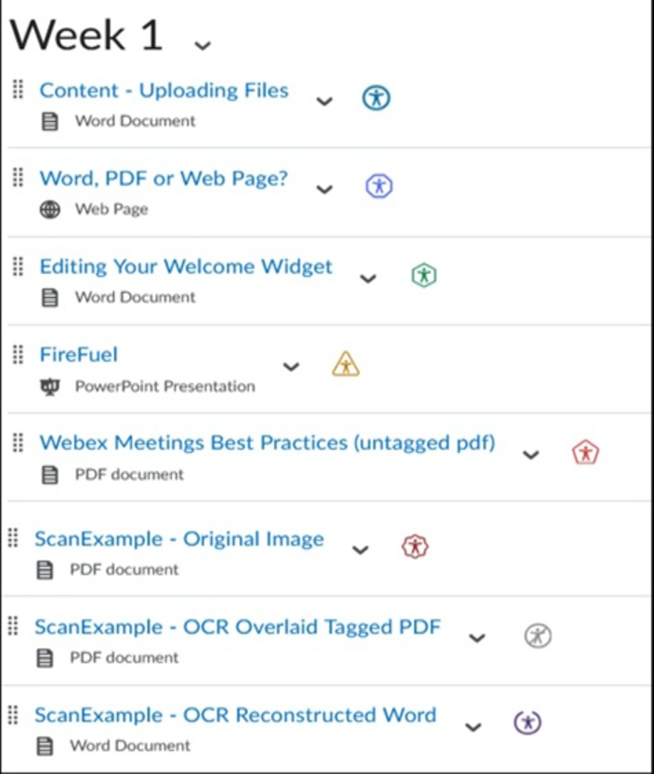
Remember: Green is Good, Blue is Better!
Just as your students do their best to pass your classes, you should strive to ace your accessibility scores. While it can be difficult to achieve a perfect 100% accessibility score, you should still strive to be a straight A student with green badges across your courses. Remember that even straight A students are not always perfect!
Other Changes
To make it easier to keep track of your courses’ accessibility scores, we have also enabled two new Panorama features.
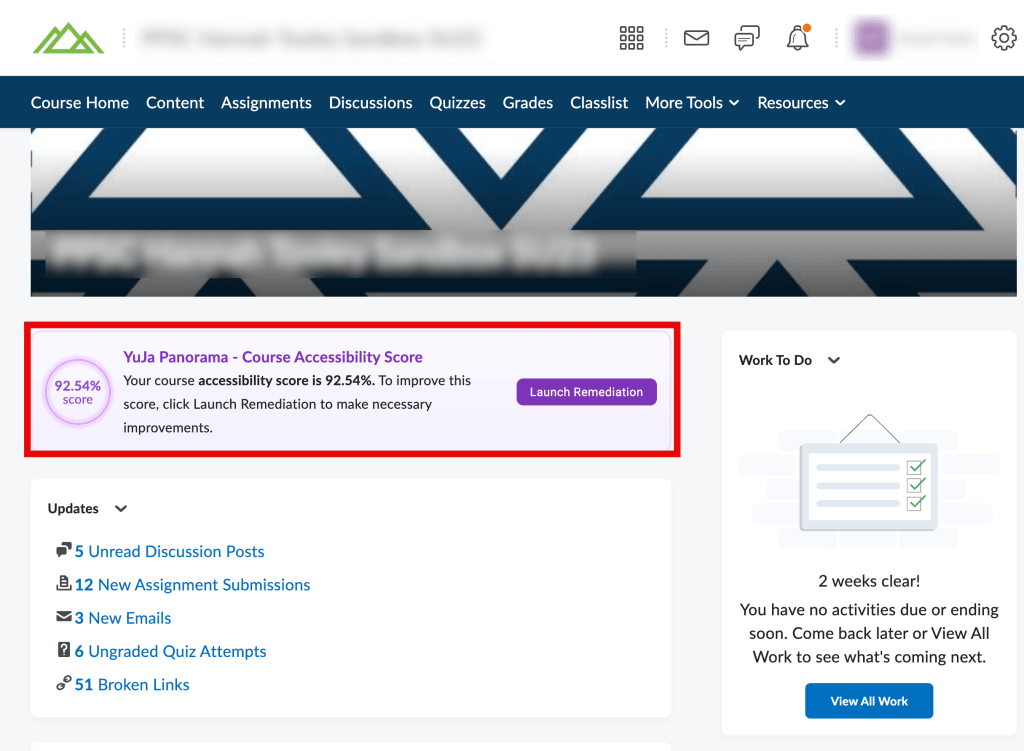
Accessibility Score Banner
You can easily keep track of your course’s accessibility score right in your course homepage! You can also begin fixing files from the course homepage by selecting the “Launch Remediation” button.
PDF Font Size Remediation
This beta feature lets you fix text size errors in PDF files, which Panorama was unable to do in the past. We are enabling this as an interim feature while we investigate more substantial solutions for fixing PDF files in Panorama.
View Full Newsletter
View the full May release newsletter via Outlook.
You must be logged in to post a comment.